A Guide to Using Custom Fonts for Discord Servers
Discover how to use custom fonts for Discord. This guide covers text generators, markdown formatting, and bots to make your server's text stand out.
So, you want to change the font in Discord? Technically, you can't change the actual font file that Discord uses. But what you can do is use special Unicode characters that look like different fonts. It's a clever workaround that's become incredibly popular.
These special fonts for Discord are cooked up by external tools, and you just copy and paste them directly into your server names, channel names, and messages. The result? A completely custom look that helps your server stand out.
Why Custom Fonts Are a Game Changer for Your Server
Discord's default look is clean and consistent, which is great. But injecting a bit of personality with unique text styles can totally transform your community's vibe. It’s like moving from a generic template to a custom-designed space.
Think about it. A unique font in a channel name like 🏆-𝚌𝚑𝚊𝚖𝚙𝚒𝚘𝚗𝚜-🏆 or 🔥-𝚑𝚘𝚝-𝚝𝚊𝚔𝚎𝚜-🔥 instantly grabs the eye. It's more memorable and visually interesting, which naturally encourages people to click and see what's going on.
Creating a Distinct Server Identity
Your server's identity is built on all the little details, and text styling is a powerful tool most people overlook. Custom fonts let you build a consistent theme that matches your community. A retro-gaming server could use a pixelated font for its welcome channel, while a fantasy role-playing community might go for a gothic style in its lore channels.
This kind of subtle branding makes your server feel more professional and thoughtfully curated. It creates a sense of place, setting you apart from the thousands of other servers sticking to the default look. Even Discord itself understands this—they launched their own proprietary typeface, GG Sans, on December 1, 2022. The move was all about improving readability and creating a unified visual identity for its massive user base, which has now ballooned to over 200 million monthly active users. You can even read up on the evolution of Discord's native font to see how much thought went into it.
The goal isn't just to look different; it's to create an atmosphere. A well-chosen font sets the tone for your community—whether it's playful, serious, futuristic, or artistic—before a member even reads a single message.
Boosting User Engagement and Expression
Beyond just branding your server, custom fonts give individual users a whole new way to express themselves. Members can start using stylized text in their nicknames, statuses, or just everyday messages to show off their personality.
This adds a layer of fun and creativity to conversations, making the chat feel more dynamic and alive. And for server admins? Using a unique font for announcements or rules makes sure that important information grabs everyone's attention and doesn't just get buried in a sea of standard text.
Mastering Discord's Built-In Text Formatting
Before you go hunting for a fancy font generator, it's worth getting to know the powerful tools already built right into Discord. The platform uses a simple formatting system called Markdown, and learning just a few of its tricks gives you a huge advantage in making your messages clear and organized.
These aren't just for looks; they solve real problems. Think about structuring a long #rules channel with clean headers so people actually read them, or making key dates in an #announcements channel impossible to miss. It's all done with a few simple characters.
Core Formatting Styles
The most common styles are all about adding emphasis. They’re super intuitive, and you’ll have them memorized after using them just a few times.
- For Bold Text: Wrap your text with two asterisks.
**Welcome Everyone!**becomes Welcome Everyone! - For Italicized Text: Use a single asterisk on each side.
*Please read the rules*becomes Please read the rules. - For Underlined Text: Surround your message with two underscores.
__Deadline is Friday__becomes Deadline is Friday.
You can even stack them for extra impact. For instance, wrapping a message like ***Important Update*** will make it both bold and italicized—perfect for grabbing attention on high-priority alerts.
Advanced Formatting for Organization
Once you've got the basics down, Markdown offers some seriously useful tools for presenting information. These are game-changers for server admins and mods who need to lay out complex details without causing confusion.
Headers, for example, can make a wall of text instantly scannable. Just starting a line with a single hash (# Welcome) creates a large, bold header. It's a simple move, but it's used in an estimated 74% of gaming servers for their announcement channels. It just works.
This kind of native formatting is crucial for readability on a platform with over 656 million users, where the average person spends 94 minutes a day. Dig deeper into Discord’s user engagement metrics to see why clear communication is so important.
For a quick reference, here’s a little cheat sheet of the most useful commands.
Quick Guide to Discord Markdown
| Desired Style | Markdown Syntax | Example Usage |
|---|---|---|
| Bold | **text** |
Please check the **announcements** channel. |
| Italics | *text* |
*This is a friendly reminder.* |
| Underline | __text__ |
The event is on __Saturday__. |
~~text~~ |
~~Old Rule~~ New Rule |
|
Code Block |
`text` |
Use the `!help` command for info. |
| Spoiler | ` | |
| > Blockquote | > text |
> "A quote from another user." |
This table covers the essentials for making your messages more dynamic and organized without any external tools.
Pro Tip: Blockquotes are my go-to for highlighting user feedback or quoting a key part of an announcement. Just start your line with
>(the greater-than symbol followed by a space). It creates an indented block of text that immediately draws the eye.
Finally, don't sleep on spoiler tags and code blocks. Spoilers, created with ||your hidden text||, are a must for any server discussing movies, TV shows, or games. Code blocks, made with backticks (`), are amazing for more than just code. They preserve all spacing and use a monospaced font, making them perfect for creating clean, aligned layouts for things like event schedules or server stats.
How to Use Font Generators for Unique Styles
 While Discord's built-in Markdown is great for basic formatting, font generators are where the real fun begins. These browser-based tools are the secret sauce behind the most visually distinct servers, letting you instantly transform plain text into something eye-catching.
A common misconception is that these tools are installing new fonts on your device. What's really happening is much simpler: they're swapping standard letters for special Unicode characters. Unicode is the universal standard for text, which is why a stylized message you create on your machine shows up perfectly on everyone else's screen—no downloads needed.
The whole process is incredibly straightforward: type your message, pick a style you like, and copy-paste it directly into Discord.
Finding and Using a Font Generator
A quick search will turn up countless free font generators, each with a library of unique text styles. Most have a dead-simple interface: you type your text into a box and instantly see it converted into dozens of different looks.
Here’s the typical workflow you'll follow to create unique fonts for Discord:
- Type Your Text: Find the input box on the generator's website and enter the phrase you want to stylize.
- Browse the Styles: The tool will automatically generate your text in various formats, like script, gothic, circled letters, or small caps. Scroll through and see what catches your eye.
- Copy Your Favorite: Found one you love? There’s almost always a "copy" button right next to it. One click, and it’s on your clipboard.
- Paste into Discord: Head over to your Discord server and paste the text. You can use it in a channel name, your user status, a message, or even your nickname.
The interface is built for speed. You can find a style that fits your server's theme in seconds, without any technical headaches.
Practical Scenarios for Custom Fonts
The real power of these fonts is in how you use them. A little goes a long way. Overdo it, and your server becomes a chaotic mess. But apply them strategically in key areas, and you'll have a huge impact. Many tools also offer cool effects; you might want to look into a glitch text generator for a cool, distorted aesthetic.
Here are a few real-world examples to get you started:
- Channel Names: Make your most important channels impossible to miss. A name like
🎉-𝘎𝘪𝘷𝘦𝘢𝘸𝘢𝘺𝘴-🎉or📢-𝔸𝕟𝕟𝕠𝕦𝕟𝕔𝕖𝕞𝕖𝕟𝕥𝕤-📢stands out far more than the plain-text version. - User Roles: Give prestigious roles some extra flair. A top-tier role named
👑 𝓥𝓘𝓟 👑feels more special and can even encourage members to get more involved. - Welcome Messages: Set the tone from the moment someone joins with a unique welcome message that reflects your server's personality.
- User Status: Use a custom font in your status to share what you're up to, promote an event, or just show off your mood in a more interesting way.
Key Takeaway: Think of these fonts as decoration and emphasis. They’re meant to highlight key information or inject personality, not replace all your standard text. For longer messages, always stick to what's most readable.
Expanding Your Options with Bots and Advanced Tools
 Copy-pasting from a font generator is a great way to get started, but the rabbit hole of Discord customization goes much, much deeper. For server owners and anyone serious about creating a unique community vibe, bots and other advanced tools are where the real magic happens.
These tools can automate your styling, help you craft more professional-looking announcements, and integrate text effects in ways that manual copy-pasting just can't touch. You're essentially offloading the work to an automated service, which frees you up and ensures everything looks consistent. This is how the big, active communities create that polished, well-managed feel.
Automating Style with Discord Bots
Discord bots are the workhorses of any good server, and plenty of them are built to handle text styling. Instead of you having to leave Discord to find a generator, a bot can take your plain text and instantly convert it with a simple command. This is a game-changer for moderators who need to post frequent, stylized announcements.
Some bots even go a step further by generating actual images with true custom fonts, not just Unicode characters. Imagine whipping up a professional-looking welcome banner or event graphic right inside a channel.
- Command-Based Styling: Just type a simple command like
!fancy Welcome everyone!and the bot will post a stylized message for you. - Announcement Embeds: Many bots can create those clean, colorful boxes called "embeds." They can apply special text styles inside these embeds, making announcements look incredibly organized and professional.
- Image Generation: More advanced bots can render your text using any font file you can think of and post it as an image—perfect for those high-impact moments.
By bringing bots into your workflow, you turn text styling from a chore into a streamlined server function. It ensures all your admins can produce consistently branded messages, strengthening your community's visual identity with every post.
Leveraging Webhooks and Nitro Perks
If you're comfortable with a little more technical setup, webhooks are a powerful way to pipe richly formatted messages into Discord from other apps. Think of it as a private, direct line into your server. You could set up a webhook to automatically post updates from your blog, social media, or a game server, all formatted with custom styles before they even hit your channel.
On the other end of the spectrum, you have Discord Nitro perks. While Nitro doesn't let you type directly in different fonts, it unlocks a ton of graphical customization options that achieve a similar goal.
- Custom Profile Banners: Nitro users can upload animated banners to their profiles, which are often designed with stylized text to show off their personality.
- Server Banners: Boosted servers get to add a server banner—prime real estate for displaying your community's name in a custom, branded font.
- Custom Stickers: You can create and upload your own custom stickers, which can be designed with unique fonts and graphics to use as reactions or quick messages.
These tools really are the next level of using fonts for Discord, moving you beyond simple chat messages into full-blown server branding and automation. If you're looking for more ways to get creative, check out the various text tools and visual generators available for creators.
Best Practices for Readability and Accessibility
Unleashing creative fonts in your Discord server is an exciting way to stand out, but it comes with a responsibility to keep your community inclusive and easy to navigate. While a unique font can make a channel name pop, going overboard with complex or decorative styles can quickly turn your server into a chaotic, unreadable space that just frustrates members.
The goal is finding that sweet spot between personality and practicality. A wall of gothic or script text might look cool for a moment, but it can be a nightmare to read for long periods, especially for users with dyslexia or other visual impairments.
Prioritize Accessibility for All Members
This is probably the most critical piece of the puzzle: accessibility. Many of the stylish Unicode characters used by fonts for Discord are completely invisible to screen reader software, which is essential for visually impaired users. When a screen reader encounters something like 🌟 𝓦𝓮𝓵𝓬𝓸𝓶𝓮 🌟, it might just say "star welcome star" or skip the stylized text altogether.
This effectively locks a portion of your community out of understanding key information. If you want to create a genuinely welcoming environment, you have to make sure vital text is accessible to everyone, regardless of ability.
Key Takeaway: If the information is important—server rules, announcements, or role instructions—always use Discord's standard font. Save the fancy stuff for purely decorative elements where the meaning is obvious from the context.
Use Custom Fonts Strategically and Sparingly
The best approach is to treat custom fonts like spices in a recipe: a little bit adds flavor, but too much ruins the dish. When you use them selectively, you actually increase their impact and avoid overwhelming your members. Stylish Unicode fonts have become massively popular in Discord's ecosystem, enhancing content across its 28,000+ community servers with bold, script, and monospace styles that work seamlessly on both desktop and mobile. If you're curious about how widely these styles are adopted, you can check out this data on Discord font usage.
Here are a few practical ways to use custom fonts effectively:
- For Headers and Titles: A custom font is perfect for a channel name like
『💬』generalor for a section header in your rules. It helps with navigation without hurting readability where it matters most. - For Decorative Elements: Add flair with stylized text in non-essential areas. For example, using special characters to frame a channel name or in a user status is a great way to show some personality. You can also explore a huge library of symbols to find unique icons that complement your text.
- Avoid for Long Paragraphs: Never, ever use a custom font for big blocks of text. Important announcements, detailed event descriptions, and community guidelines should always be in a standard, legible font to guarantee everyone can read them clearly.
Common Questions About Discord Fonts
Once you start exploring custom text styles in Discord, a few questions tend to pop up pretty quickly. Whether you’re a server owner trying to carve out a unique aesthetic or just a user wanting to spice up your messages, getting straight answers makes everything easier. Let's tackle the most common questions I hear.
One of the first things people ask is, "Are these fancy font generators even safe?" It's a fair question. You're copying text from a third-party website, so a little caution is natural.
The good news is that the process is completely safe. You aren't downloading or running any software. You're just copying a string of Unicode characters—think of it as copying text from a Word document. The generators themselves are generally harmless, but it’s always a good idea to stick to reputable sites. The text they create is just a sequence of symbols that Discord already knows how to display, posing zero security risk to your account or device.
Will Custom Fonts Work Everywhere on Discord?
Another frequent question is about compatibility. If you find a cool font for your nickname, can you use it for a channel name, too? The answer is a big yes. Since these aren't technically fonts but Unicode characters, they're supported almost universally across the entire Discord platform.
You can pop these stylized characters into all sorts of places:
- Your username or a server-specific nickname
- Names for channels and categories
- Role titles and server descriptions
- Regular chat messages and even your status
This consistency is a huge plus. A slick-looking channel name you set up on your PC will look just the same to a friend checking it out on their phone. This universal support is exactly why using unique fonts for Discord has become such a popular way for people to add personal flair or build a server brand.
Key Insight: The main roadblock you might hit isn't platform compatibility—it's character support on a user's device. On rare occasions, a super obscure or brand-new Unicode character might show up as a blank square (
☐) on older operating systems that haven't updated their symbol library.
Can Using Fancy Fonts Get Me in Trouble?
The fear of breaking Discord's Terms of Service is another common worry, but you can relax. Using custom fonts for decoration or emphasis is perfectly fine and not against any rules. Discord is all about customization and expression, and this is just another tool communities use to make their space feel like their own.
However, your intent is what really matters. If you use an unreadable font to spam a channel or craft an offensive username, you can absolutely face moderation. In that scenario, the problem isn't the font itself—it's how you chose to use it.
When in doubt, this little decision tree is a great rule of thumb.
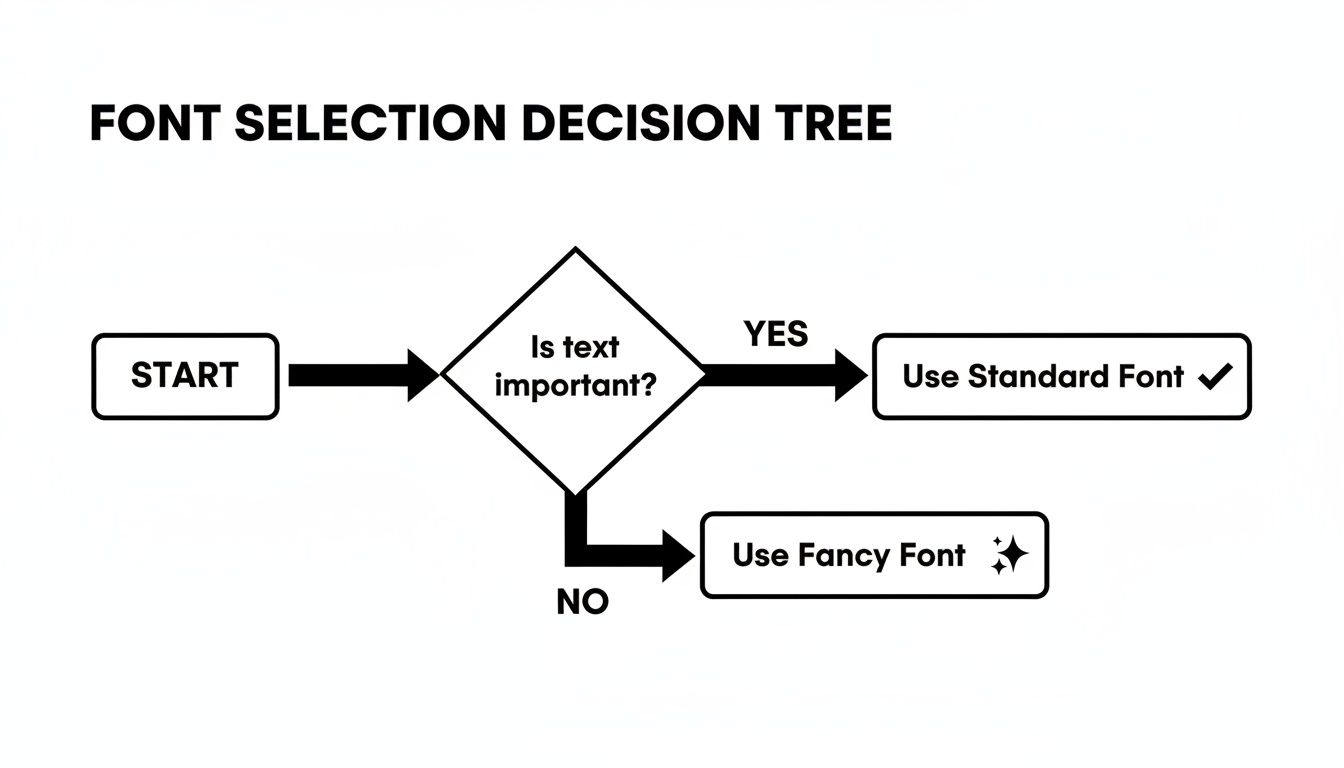
This graphic drives home the most important principle: always prioritize clarity for important information. Save the decorative styles for flair and non-essential text. Following that simple guideline helps you keep your server both stylish and accessible for everyone.
At MakerSilo, we provide a massive library of free text tools and symbols to help you create, transform, and publish instantly. Explore our tools at MakerSilo and start elevating your content today.